Bloom Filters
Bloom Filters
Many systems constantly ask "do I have this item?": has this username been taken, has this URL been crawled, does this file contain this key? Answering exactly can mean a disk read or a network call every time. A Bloom filter answers the question using a small amount of memory and no disk access, with one honest limitation: it can say "maybe" when the true answer is "no", but it never says "no" when the answer is "yes".
The obvious approach: store every item
The exact answer comes from keeping every item in a set, such as a hash table, and looking it up. That is correct, but the memory grows with the size of the items themselves. A billion URLs averaging 100 bytes each need about 100 GB just for the strings, before any overhead. That does not fit in the memory of a typical server, so lookups fall back to disk, and every check becomes slow.
The idea: remember a few bits per item
A Bloom filter keeps only a bit array (a long row of 0s and 1s, all 0 at the start) and a few hash functions. It never stores the items themselves.
Adding an item
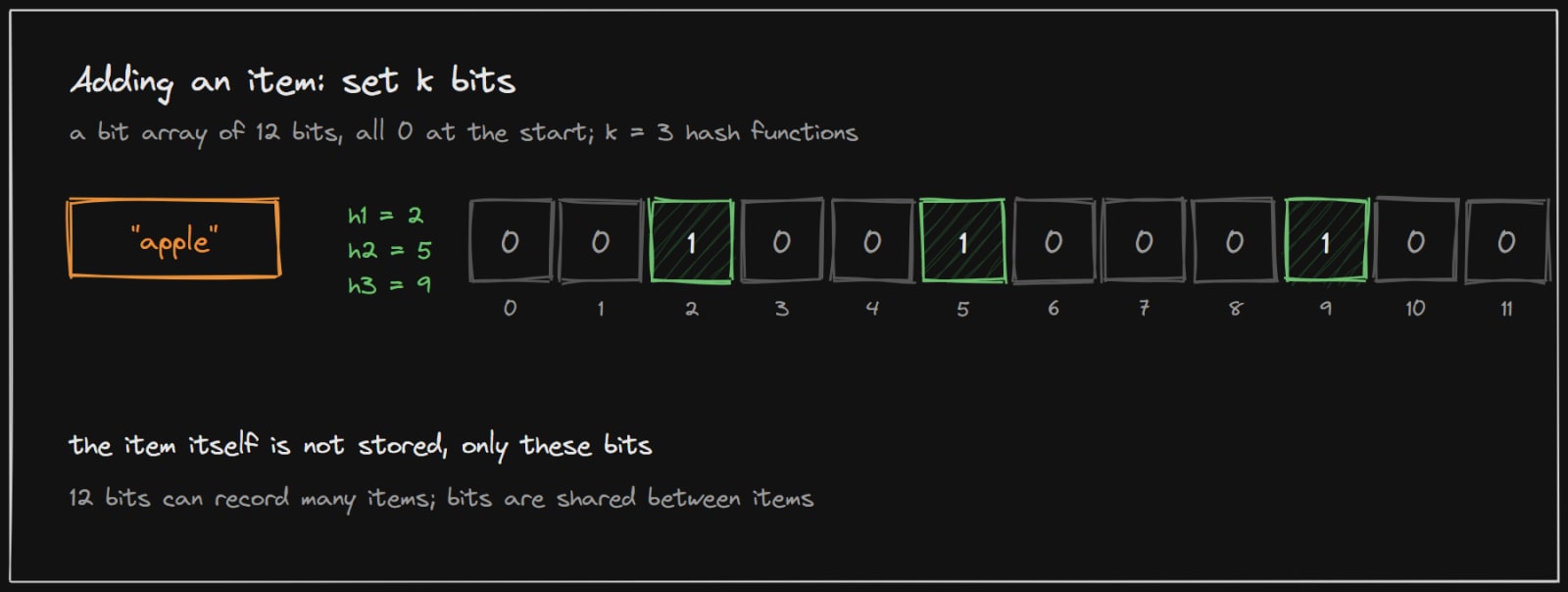
To add "apple", run it through each of the k hash functions. Each one gives a position in the array, here 2, 5 and 9, and those bits are set to 1. That is all. Many items share the same array, so their bits overlap.
Checking an item
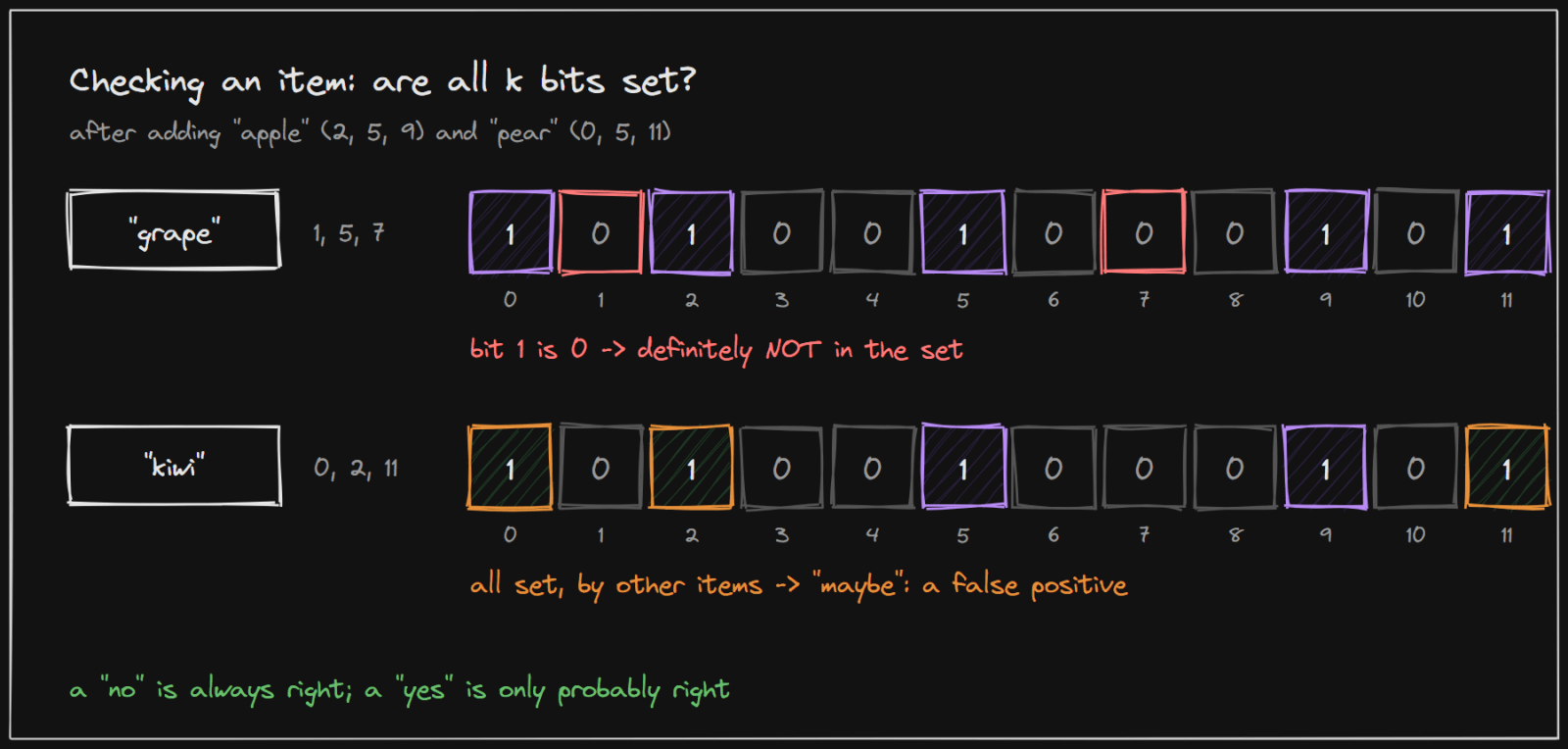
To check an item, hash it the same way and look at its bits:
- If any bit is 0, the item is definitely not in the set. Had it been added, that bit would be 1. "grape" lands on bit 1, which is 0, so it was never added.
- If all bits are 1, the item is probably in the set. "kiwi" lands on bits 0, 2 and 11, which happen to have been set by "apple" and "pear". The filter says "maybe", but kiwi was never added. This is a false positive.
So a "no" is always correct, and a "yes" means "probably; check properly if it matters".
Worked example: is this username taken?
A sign-up form checks whether a username is free as the user types. With millions of users, asking the database on every keystroke is expensive. A Bloom filter of all existing usernames, kept in memory, removes most of those queries.
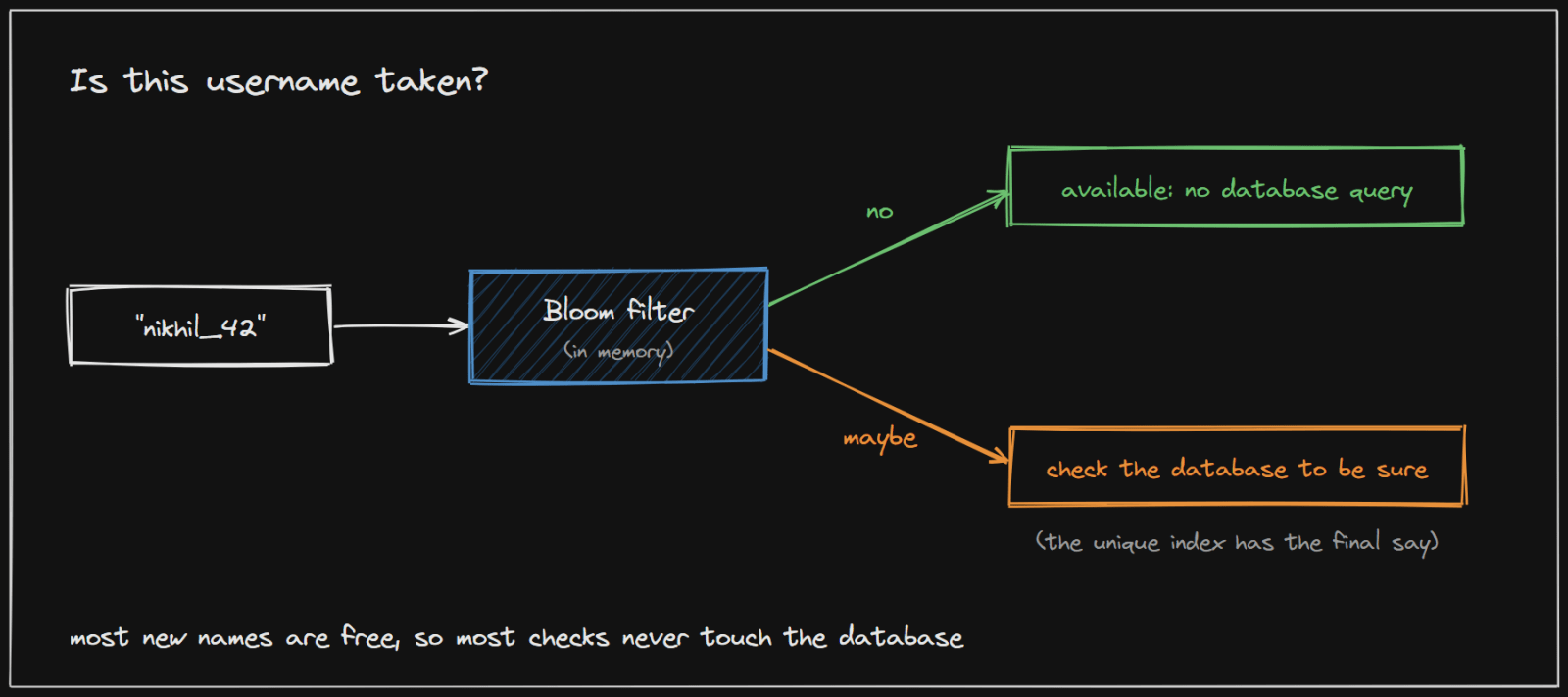
- Check the filter. Hash the requested name with the
khash functions and look at its bits. - "No" means available. If any bit is 0, the name has never been registered. Show "available" without touching the database. Because most names people try are new, this is the common case.
- "Maybe" means check the database. If all bits are 1, the name is probably taken, but it could be a false positive. Look it up in the database to be sure.
- The database still has the final say. When the user submits, the account is created in the database, whose unique index on the username rejects a duplicate. The filter only saves queries; it never decides on its own, because two users could check the same free name at the same moment.
- Keep the filter current. Add every new username to the filter as soon as the account is created. With several application servers, either each keeps its own copy refreshed regularly, or they share one filter in a central store.
Two practical details:
- Deleted accounts. A plain Bloom filter cannot remove a name, so a deleted user's name keeps answering "maybe" and simply falls through to the database check, which is still correct. Rebuild the filter from the database occasionally (for example, nightly) to clear such names out.
- Sizing. For 100 million usernames at a 1% false positive rate, the filter needs about 9.6 bits per name, roughly 120 MB, which fits comfortably in memory. The usernames themselves would take several times that.
Choosing the size
The chance of a false positive depends on three numbers: the number of bits m, the number of items n and the number of hash functions k. The standard results are:
- false positive rate ≈
(1 - e^(-k·n/m))^k - the best number of hash functions is
k = (m/n) · ln 2
In practice it is easier to think in bits per item:
- about 4.8 bits per item for a 10% false positive rate (with about 3 hash functions)
- about 9.6 bits per item for 1% (about 7 hash functions)
- about 14.4 bits per item for 0.1% (about 10 hash functions)
A billion items at a 1% false positive rate need about 1.1 GB, compared with about 100 GB to store a billion 100-byte URLs. Each extra 4.8 bits per item cuts the false positive rate by about ten times.
The limits
- False positives. The filter can be wrong in one direction, so it is used to skip work, never as the final answer when "yes" matters.
- No deletion. Clearing a bit might also remove another item that shares it. Variants such as counting Bloom filters allow deletion at the cost of more memory.
- Fixed capacity. Add far more items than it was sized for and nearly every bit becomes 1, so almost every answer becomes "maybe". It must be sized for the expected number of items.
A real system: Cassandra
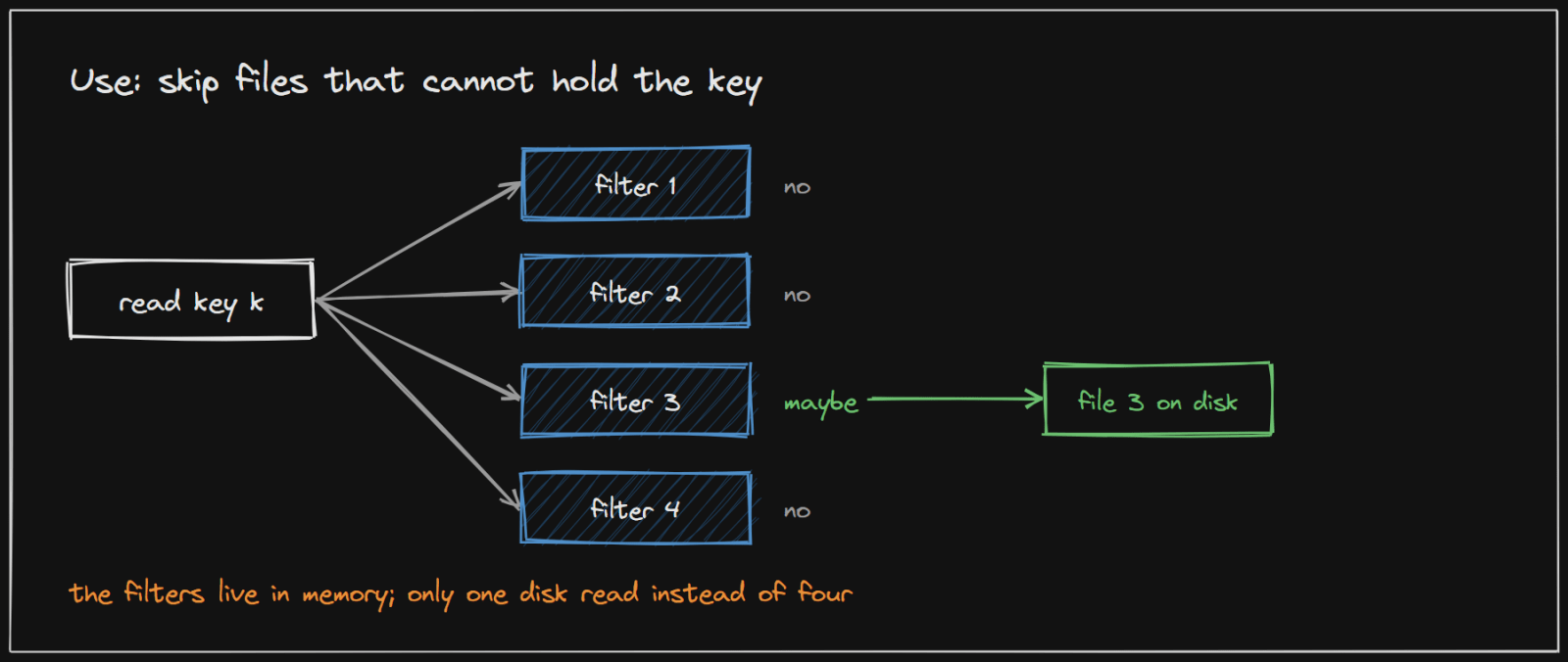
Apache Cassandra stores data in many immutable files on disk, called SSTables, and a given key could be in any of them. Its documentation explains: "To avoid checking every SSTable data file for the partition being requested, Cassandra employs a data structure known as a bloom filter". Each filter gives one of two answers: "The data definitely does not exist in the given file, or - The data probably exists in the given file."
The false positive rate is configurable per table through bloom_filter_fp_chance. In the documentation's words, "The default value for bloom_filter_fp_chance is 0.1 for tables using LeveledCompactionStrategy and 0.01 for all other cases". A lower value means fewer wasted disk reads, at the cost of more memory.
Preventing cache penetration
Cache penetration is a flood of requests for keys that do not exist, such as /products/<random id>. A cache only stores things that exist, so every such request misses the cache and reaches the database (see Caching). Caching the "not found" answer helps when the same missing key is asked for again, but an attacker who sends a new random key every time gets a fresh miss on every request.
A Bloom filter fixes this because it can answer "no" about keys it has never seen. Put every real key into a filter, and check the filter before the cache:
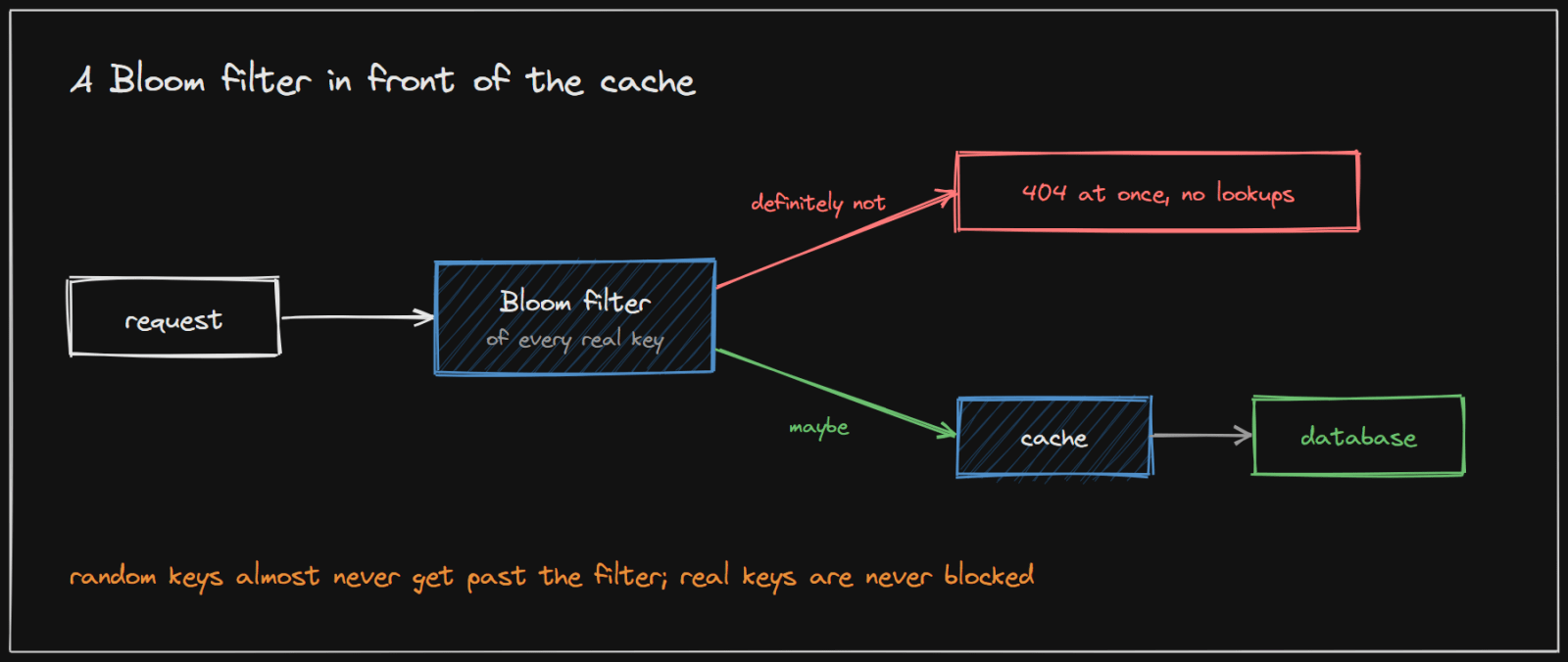
- Definitely not (at least one bit is 0): return 404 at once. No cache lookup, no database query.
- Maybe (all bits are 1): continue as normal, cache first, then the database.
Why it works:
- Real keys are never blocked. A Bloom filter has no false negatives. Redis's documentation puts it this way: "when it responds that an item is not present in a set (a negative answer), you can be sure that indeed is the case."
- Random keys almost never get through. With a 1% false positive rate, only about 1 in 100 random keys passes the filter. An attack of 10,000 requests per second becomes about 100 database queries per second. Those few can then be caught by negative caching.
- It is cheap. Checking it is a few hashes and a few memory reads, faster than a cache lookup over the network. A million keys at 1% fit in about 1.2 MB.
What it takes to run it:
- Add every new key to the filter when it is created, in the same code path that writes it to the database. A key created but missing from the filter would be wrongly rejected as "definitely not", which is the one mistake a Bloom filter must never make.
- Fill it on startup by loading every existing key from the database, and rebuild it periodically. Since deleted keys cannot be removed from a plain Bloom filter, they keep answering "maybe" until the next rebuild; that is harmless, because the cache and the database still answer correctly.
- Size it for growth (see "Choosing the size" above). An overfilled filter answers "maybe" to almost everything and stops protecting anything.
- Know when it is worth it. It pays off when the set of valid keys is large and attackers can guess the URL format. For a small set, such as a few hundred article slugs, an in-memory set of the exact keys does the same job with no false positives at all.
Where else this shows up
- Databases and storage engines built on many on-disk files, such as Cassandra, HBase and RocksDB, use them to skip files that cannot hold a key.
- Web crawlers use them to avoid fetching URLs already seen.
- Caches use them to avoid storing items that are only ever requested once.
- Recommendation systems use them to avoid showing an item a user has already seen.
The common pattern: a cheap check in memory that avoids an expensive operation most of the time.
Implementing it in your project
Java, with Guava. Guava's BloomFilter is sized from the expected number of items and the false positive rate you accept:
BloomFilter<String> usernames = BloomFilter.create(
        Funnels.stringFunnel(StandardCharsets.UTF_8),
        100_000_000,   // expected insertions
        0.01);         // 1% false positives

usernames.put("nikhil_42");
if (!usernames.mightContain(name)) {
    // definitely not taken: no database query needed
} else {
    // maybe taken: check the database
}
Guava documents that mightContain returns false only "if this is definitely not the case", and warns that inserting far more items than planned causes "a sharp deterioration" of the false positive rate. Size it for growth, and rebuild it from the database periodically.
Shared across servers. Redis 8 and Redis Stack include Bloom filter commands (BF.RESERVE, BF.ADD, BF.EXISTS), so every application server can use one shared filter. Size it with BF.RESERVE {key} {error_rate} {capacity}. Redis notes that adding never fails because the filter is "full"; instead "the error rate starts to grow", so watch the count.
BF.RESERVE product_ids 0.01 1000000
BF.ADD product_ids 8f3a21        # on every create
BF.EXISTS product_ids 77c0de     # 0 means definitely not: return 404
Sources and credibility
Everything above is written from scratch; the quotes come from the source below, attributed where used.
Primary (highest confidence)
- Bloom Filters, Apache Cassandra documentation (5.0). Source of the SSTable use, the two answers and the
bloom_filter_fp_chancedefaults. - Bloom filter, Redis documentation. Source of the no-false-negatives quote,
BF.RESERVEand the error-rate growth note.
Academic (the origin of the idea)
- Burton H. Bloom, Space/Time Trade-offs in Hash Coding with Allowable Errors, Communications of the ACM, 1970. The paper that introduced the technique.
Method
- The false positive formula and the bits-per-item figures are the standard results for Bloom filters; the figures above were calculated from them.
On copyright: the diagrams on this page were drawn for this article, and the explanations are original. Quoted phrases are short and attributed.