Connection Pooling
Connection Pooling
Every request that touches a database needs a connection to it. Opening a connection is surprisingly expensive, and a database can only do so much work at once, so almost every production application keeps a small set of open connections and shares them between requests. That set is a connection pool. This topic explains why pools exist, how they work, and how to size one, including the counter-intuitive fact that a smaller pool is often faster.
The obvious approach: one connection per request
The simplest code opens a connection when a request arrives, runs its query, and closes it. It works on a laptop. Under real traffic it fails in two ways.
Opening a connection is slow
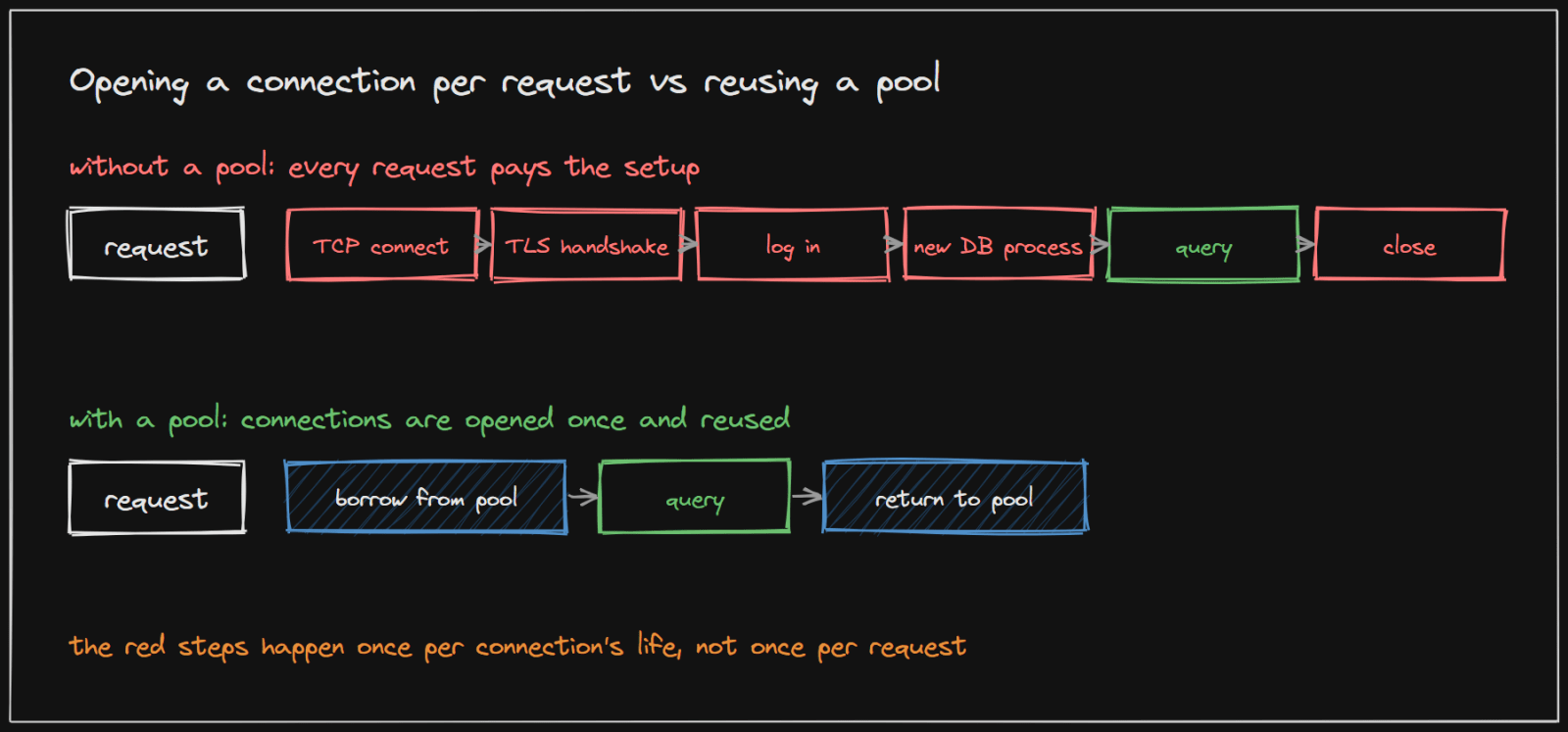
Before the first query can run, a new connection must:
- open a TCP connection across the network;
- complete a TLS handshake if the connection is encrypted;
- log in, with the database checking the user and password;
- set up the server side: PostgreSQL starts a separate operating-system process for each connection, with its own memory.
All of that often takes longer than the query itself. Paying it on every request wastes time and puts heavy load on the database just to say hello.
Too many connections overwhelm the database
If every request has its own connection, a traffic spike means hundreds or thousands of connections at once. The database cannot run them all at the same time: it has a fixed number of CPU cores and disks. PostgreSQL's own default limit, max_connections, is "typically 100 connections", and each connection costs memory even when idle.
The fix: a pool of reusable connections
A pool opens a set number of connections when the application starts and keeps them open. A request borrows one, runs its queries, and returns it. The expensive setup happens once per connection, not once per request.
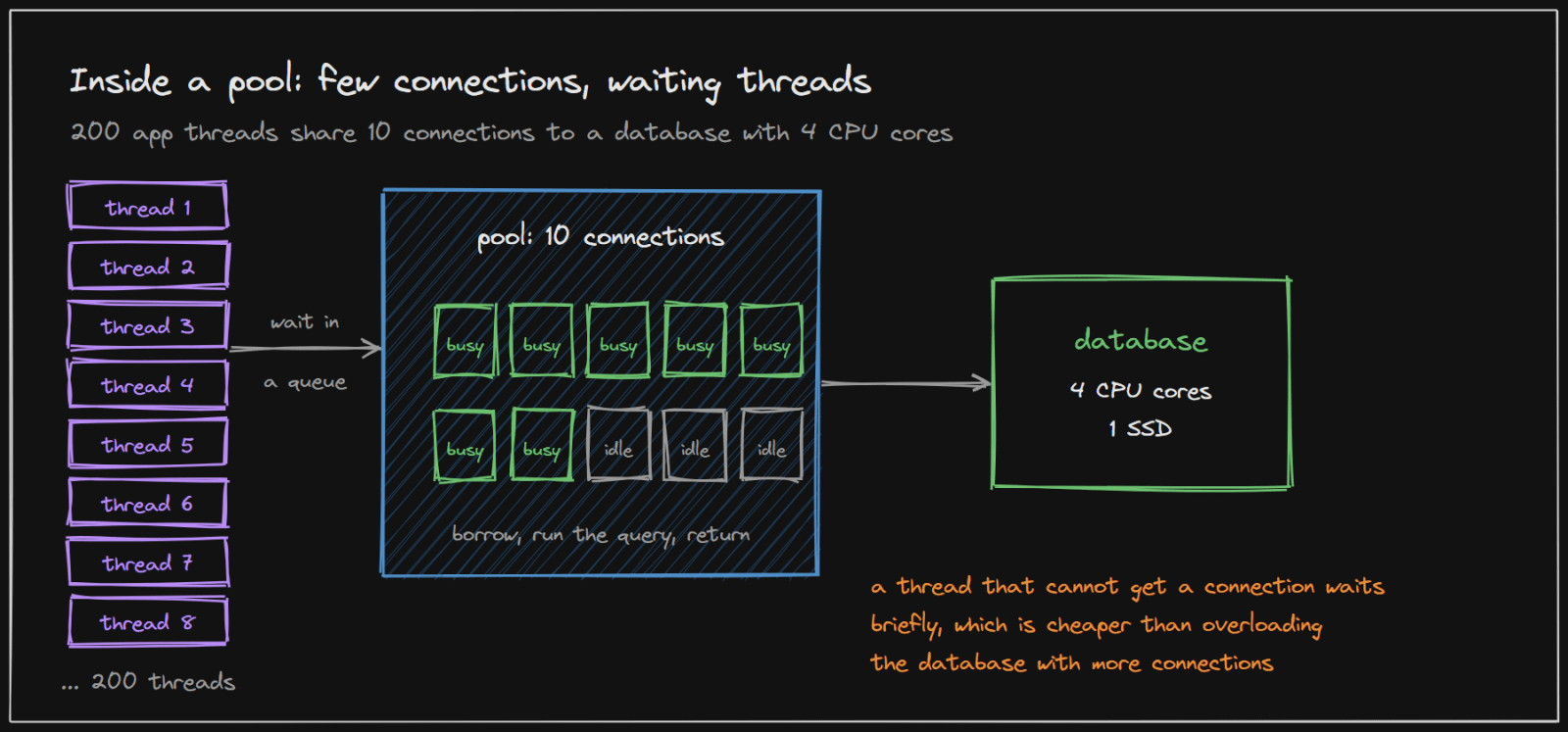
The important behaviour is what happens when every connection is in use: the next request waits in a queue for one to be returned. That sounds bad, but it is exactly what protects the database, as the next section shows.
The settings every pool has:
- Maximum size: the most connections the pool will open. In HikariCP, the standard Java pool, this is
maximumPoolSize, which "controls the maximum size that the pool is allowed to reach, including both idle and in-use connections", default 10. - Connection timeout: how long a request waits for a free connection before failing. HikariCP documents that calls "will block for up to connectionTimeout milliseconds before timing out."
- Minimum idle: how many connections to keep open when traffic is quiet.
- Maximum lifetime: connections are replaced after a while, so none lives forever.
How big should the pool be?
Intuition says a bigger pool handles more traffic. It does not, past a point.
Why more connections can be slower
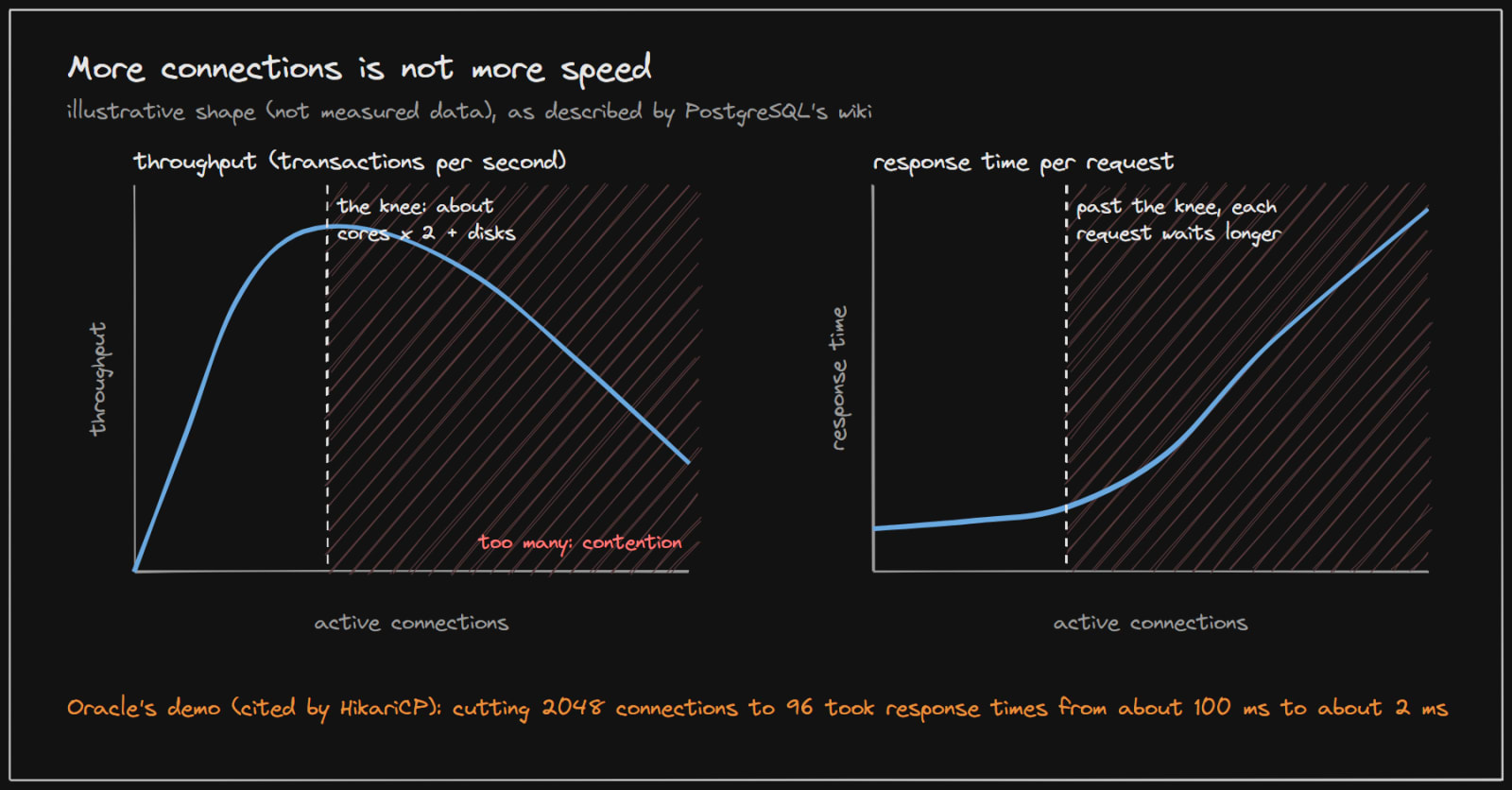
A CPU core runs one thing at a time. When there are more active connections than cores, the database constantly switches between them (context switching), they compete for locks, memory and disk, and each request takes longer. The HikariCP documentation puts it directly: "Once the number of threads exceeds the number of CPU cores, you're going slower by adding more threads, not faster."
PostgreSQL's wiki describes the shape in the graph above: "you will see performance climb as connections rise until you hit saturation, and then you have a 'knee' after which performance falls off." It also notes that PostgreSQL "will usually complete the same 10,000 transactions faster by doing them 5, 10 or 20 at a time than by doing them 500 at a time."
The most famous demonstration comes from Oracle's Real-World Performance group, described on the HikariCP wiki: dropping the pool "from 2048 down to just 96" connections "decreased the response times of the application from ~100ms to ~2ms -- over 50x improvement."
The starting formula: cores x 2
PostgreSQL's wiki gives a starting point for the number of active connections:
connections = (core_count x 2) + effective_spindle_count
- core_count is the database server's physical CPU cores, not counting hyper-threads.
- effective_spindle_count is roughly the number of disks the database waits on. It "is zero if the active data set is fully cached", and rises as more reads have to go to disk.
Why times two? While one query waits for the disk or the network, its core is idle and can run another. Doubling the cores keeps every core busy without piling up so much work that switching between connections dominates. The HikariCP wiki explains it as "More threads only perform better when blocking creates opportunities for executing."
Example: a database server with 4 cores and 1 disk: (4 x 2) + 1 = 9 connections. HikariCP's wiki uses exactly this example: a "4-Core i7 server with one hard disk should be running a connection pool of: 9".
Treat it as a starting point, not a law. The PostgreSQL wiki itself says to "try incremental adjustments with your production system to find the actual 'sweet spot'", and notes it was written before SSDs were common. With fast SSDs there is less waiting, so a number closer to the core count tends to work better.
The rule to remember
The HikariCP wiki sums it up: "You want a small pool, saturated with threads waiting for connections." A few dozen connections at most, with the rest of the application's threads waiting their turn, is usually faster than letting everyone in at once.
A real system: Systema itself
Systema's backend uses Spring Boot with HikariCP and does not configure a pool size, so it runs with HikariCP's default of 10 connections. Its database currently shares a server with 1 CPU core. With the data set fully cached, the formula suggests (1 x 2) + 0 = 2 active connections.
Is 10 wrong, then? Not at today's load. A pool is a maximum: with modest traffic, only one or two connections are busy at a time, and the rest sit idle. The difference would only show under heavy concurrent load, where 10 queries competing for one core would each run slower than 2 or 3 queries taking turns. At that point the right move is to measure, lower the pool towards the formula, and watch response times, exactly the experiment the PostgreSQL wiki recommends.
Many application servers, one database
The formula is about the total number of active connections the database sees, not per application server. If five application servers each have a pool of 10, the database sees up to 50 connections. So:
- Divide the budget: total pool size across all servers should stay near what the database can use well.
- Keep
max_connectionsa little above that total. The PostgreSQL wiki advises: "You should always make max_connections a bit bigger than the number of connections you enable in your connection pool." - With many servers or serverless functions, put a central pooler such as PgBouncer in front of the database, so thousands of short-lived clients share a few dozen real connections.
Implementing it in your project
-
Java and Spring Boot: HikariCP is included by default. Set the pool explicitly rather than relying on the default:
spring: datasource: hikari: maximum-pool-size: 10 # start near (database cores x 2) + disks, then measure connection-timeout: 3000 # milliseconds a request may wait for a connection max-lifetime: 1800000 # replace connections every 30 minutes -
Node.js:
pg.Poolin thepglibrary, with itsmaxoption. Create one pool for the whole process, never one per request. -
Python: SQLAlchemy's engine pools by default (
pool_size,max_overflow); create the engine once at startup. -
Always return connections. Use the language's automatic cleanup (
try-with-resources in Java,within Python,finallyblocks) so a connection is returned even when a query fails. A leaked connection is lost from the pool until it times out. -
Keep transactions short. A connection held during a slow external API call is a connection nobody else can use.
-
Watch the pool: how many connections are active, how many requests are waiting, and how long they wait. HikariCP and most pools expose these as metrics. Long waits with an idle database mean the pool is too small; a busy database with rising response times means it is too big.
How to use this in an interview
When your design has many application servers talking to one database, say how connections are managed: a pool per server, sized so the total stays near what the database can use (cores x 2 as the starting point), and a pooler such as PgBouncer if the number of servers grows. Mentioning that a smaller pool can be faster, and why, shows real understanding.
Sources and credibility
Everything above is written from scratch; the quotes come from the sources below, attributed where used.
Primary (highest confidence)
- About Pool Sizing, HikariCP wiki. Source of the Oracle demo figures, the 4-core example, the thread and blocking quotes, and the small-pool axiom. The figures come from the Oracle Real-World Performance group video it links to.
- Number Of Database Connections, PostgreSQL wiki. Source of the formula, its caveats, the knee description, the 5-10-20 versus 500 example and the max_connections advice.
- Connections and Authentication, PostgreSQL documentation. Source of the max_connections default.
- HikariCP, README. Source of
maximumPoolSize, its default of 10, and the connectionTimeout behaviour.
Method
- The graph shows the shape the PostgreSQL wiki describes; it is illustrative, not a measurement. The Systema example describes this project's own configuration.
On copyright: the diagrams on this page were drawn for this article, and the explanations are original. Quoted phrases are short and attributed.