Data Partitioning
Data Partitioning
When a database outgrows one machine, in data size, write load or both, the data itself has to be split. Partitioning divides a table's rows into separate parts; when those parts live on different machines, they are usually called shards, and the process sharding. Every large database system does this in some form. This topic explains the decisions involved and links to a live visualization of each technique.
The obvious approach: one bigger database
The first answers to a busy database are a bigger machine, a cache and read replicas (see Scalability Fundamentals and Caching). They work well and should come first. But they share a limit: every write still goes to one primary, and all the data still has to fit on it. When the write rate or the data size passes what one machine can handle, the only way forward is to split the data so that each machine owns part of it.
The two decisions
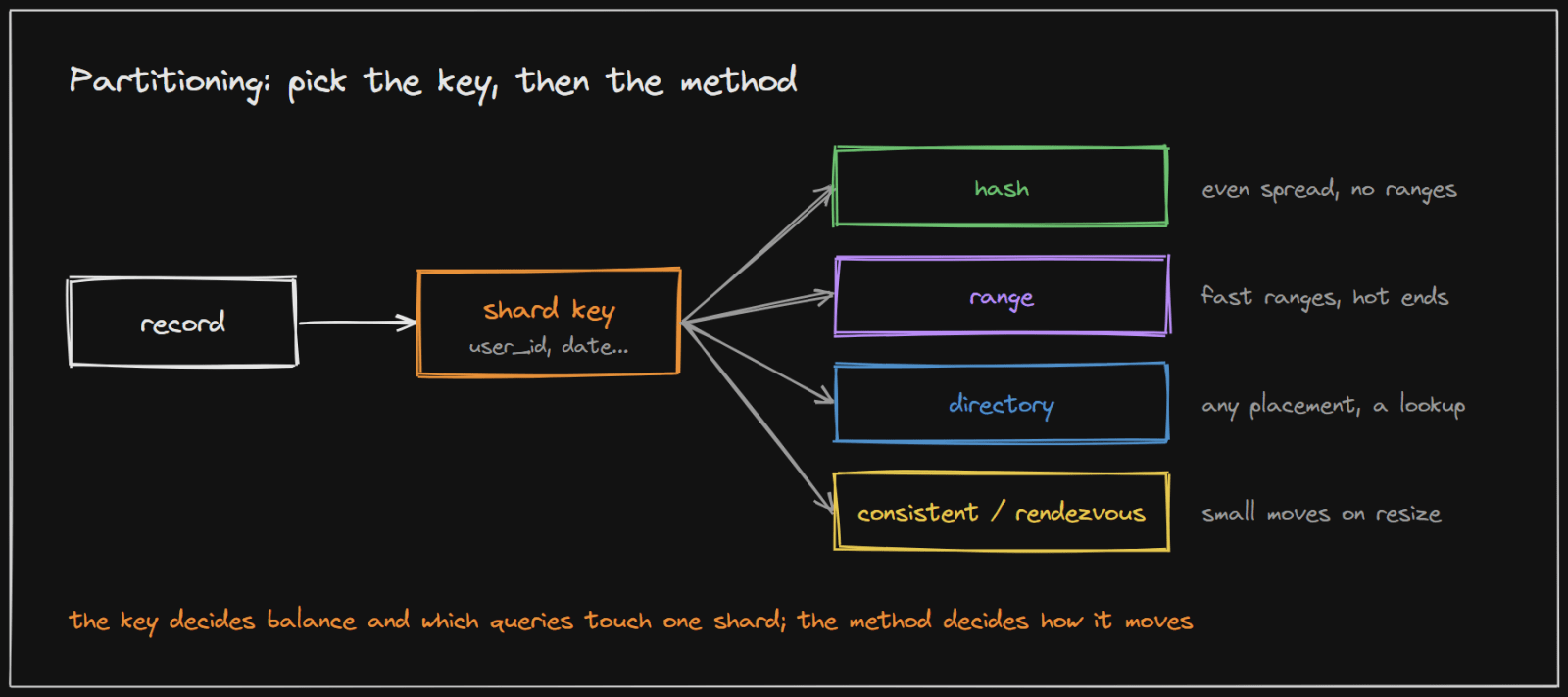
1. The partition key
The partition key (or shard key) is the field used to decide where each row lives: a user ID, a tenant ID, a date. It is the most important choice, because it decides two things:
- Balance. A key with few distinct values, or with a few very popular values, puts too much on some shards. Splitting users by country, for example, can leave one shard with a third of all users.
- Which queries stay on one shard. A query that includes the key goes to one shard. A query that does not must ask every shard and merge the answers, which is slower and grows with the number of shards.
A good key has many distinct values, spreads load evenly, and appears in most queries. For many applications that is the user or tenant ID: most requests concern one user's data.
2. The method
Given the key, a method maps each value to a shard. One line each, with a link to see it running:
- Sharding (choosing the key): the same records under different shard keys, showing even spread, hot shards and queries that must ask every shard. Visualize sharding
- Hash partitioning: hash the key and use the result to pick a shard; even spread, but range queries scatter, and plain
hash mod Nmoves most keys when N changes. Visualize hash partitioning - Range partitioning: each shard owns a continuous range of keys; range queries stay on one or two shards, but keys that only grow pile onto the last range. Visualize range partitioning
- Directory sharding: a lookup table records the shard of every key; any placement is possible, at the cost of a lookup on every request. Visualize directory sharding
- Consistent hashing: keys and shards on a ring, so adding or removing a shard moves only a small share of keys. Visualize consistent hashing
- Rendezvous hashing: every shard scores each key and the highest score wins; the same small movement as a ring, with no ring to keep. Visualize rendezvous hashing
The Consistent Hashing topic covers the ring in depth.
What partitioning costs
Splitting the data solves the size and write limits, but makes other things harder:
- Queries without the key must go to every shard and be merged.
- Joins across shards cannot be done by the database in one step; the application joins the results, or the data is arranged so related rows share a shard (for example, by sharding a user's orders by the same user ID).
- Transactions across shards are slow and complex; designs try to keep each transaction on one shard.
- Rebalancing when shards are added means moving data while the system is live. Splitting into many small logical shards from the start, more than there are machines, makes this a matter of moving whole shards.
- Hot keys remain: one very busy user or celebrity sits on one shard however many there are, and needs caching or special handling.
Real systems
MongoDB: the shard key decides everything
MongoDB's manual on choosing a shard key describes the same trade-offs. With a continent field as the key, "the shard key would have a cardinality of 7", so "adding more than seven shards would not provide any benefit". With a key that only grows, "all new inserts are routed to the chunk with maxKey as the upper bound", and that shard "becomes the bottleneck for write operations". Queries that do not include the key "are broadcast to all shards".
Notion: shard by workspace, many logical shards
Notion sharded its PostgreSQL data by workspace, because "each block belongs to exactly one workspace" and "users typically query data within a single workspace at a time". It created "480 logical shards evenly distributed across 32 physical databases", choosing 480 because it "is divisible by a lot of numbers", so machines can be added later by moving whole logical shards rather than splitting them.
Implementing it in your project
- Partition within one PostgreSQL server first. Declarative partitioning (
PARTITION BY RANGE,LISTorHASH) splits a large table into smaller physical tables on the same server. It speeds up maintenance and lets old data be dropped cheaply, for example one partition per month for events or logs, without any application change. - Choose the key early, even before sharding. Make sure the main tables carry the user or tenant ID, and that most queries filter by it. That is what makes later sharding possible without rewriting every query.
- Use an existing sharding layer rather than building one. Citus distributes PostgreSQL tables across machines, Vitess does the same for MySQL, and MongoDB, Cassandra and DynamoDB partition automatically once you choose the key.
- If you must shard in the application, keep a small shard map (logical shard to database), compute the logical shard from the key with a hash, and route every query through one function, so the rule lives in one place.
How to use this in an interview
Say first that partitioning is needed only once a bigger machine, caching and replicas are not enough. Then name the partition key and justify it from the access pattern, choose the method, and state the costs you accept: cross-shard queries, rebalancing and hot keys.
Sources and credibility
Everything above is written from scratch; the quotes come from the sources below, attributed where used.
Primary (highest confidence)
- Choose a Shard Key, MongoDB manual. Source of the cardinality, monotonic key and broadcast quotes.
- Herding elephants: lessons learned from sharding Postgres at Notion, Notion engineering blog. Source of the workspace key and the 480 logical shards over 32 databases.
Method
- The comparison of methods follows the visualizations linked above, each of which lists its own sources. The implementation advice is our own summary of standard practice.
On copyright: the diagrams on this page were drawn for this article, and the explanations are original. Quoted phrases are short and attributed.