Rate Limiting
Rate Limiting
A rate limiter caps how many requests a client may send in a given period, for example 100 requests a minute, and refuses the rest. It is one of the most common pieces of production infrastructure. It protects a service from a buggy client stuck in a retry loop, from scrapers and password-guessing attacks, and from any single user taking capacity that everyone else needs.
The problem without a limit
Every server has a limit on how much work it can do. Without a rate limiter, nothing stops one client from using all of it:
- One client can starve everyone. A single script sending thousands of requests a second slows the service for every other user.
- Costs can run away. If each request calls a paid third-party API or runs an expensive query, unbounded traffic means an unbounded bill.
- Abuse is cheap. Login and password-reset pages can be hammered with guesses at no cost to the attacker.
Where the limiter sits
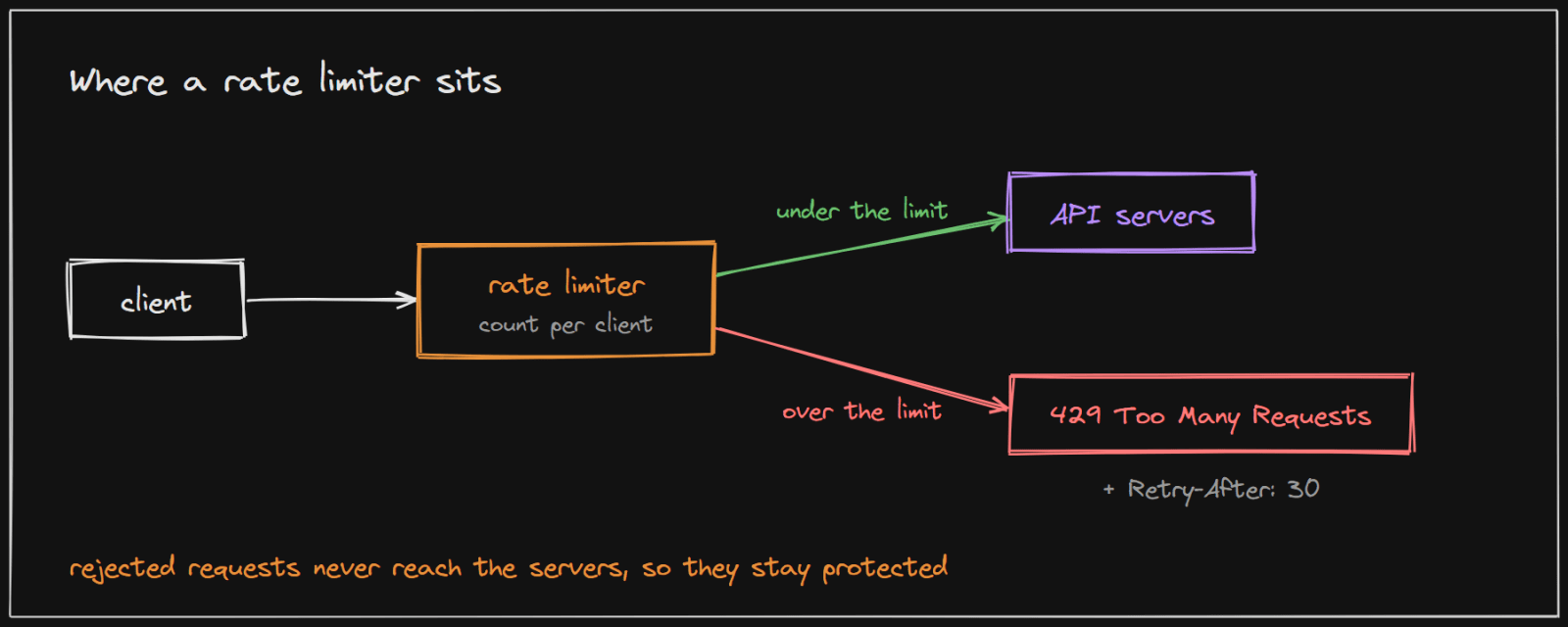
The limiter usually sits in front of the application, often in an API gateway or a middleware layer, so every endpoint is protected the same way. It identifies the client (by user ID, API key or IP address), counts its recent requests, and decides:
- Under the limit: the request passes through to the servers.
- Over the limit: the request is rejected immediately with HTTP status 429 Too Many Requests, defined in RFC 6585 for exactly this purpose. The response can include a
Retry-Afterheader telling the client how long to wait.
Rejected requests never reach the application servers, which is the point: the expensive part of the system stays protected.
Limiting only in the client (for example, in the mobile app) is not enough, because a malicious client simply ignores it.
The algorithms
Each algorithm counts requests differently, which changes how it handles bursts and how much memory it needs. Each visualization below runs the algorithm live on real traffic, so you can see its behaviour directly.
- Token bucket: tokens refill at a steady rate up to a cap, and each request spends one, so short bursts are allowed while the long-run rate stays fixed. Visualize token bucket
- Leaky bucket: requests join a queue that drains at a constant rate, so the output is perfectly smooth but bursts wait or are dropped. Visualize leaky bucket
- Fixed window counter: count requests in fixed blocks of time, such as each minute, and reset the count at each boundary; simple, but a burst on both sides of a boundary can let through nearly twice the limit. Visualize fixed window counter
- Sliding window log: keep the timestamp of every request and count only those in the last minute; exact, but memory grows with traffic. Visualize sliding window log
- Sliding window counter: estimate the last minute from the current and previous windows' counts, weighted by overlap; close to exact with very little memory. Visualize sliding window counter
The hard part: many servers
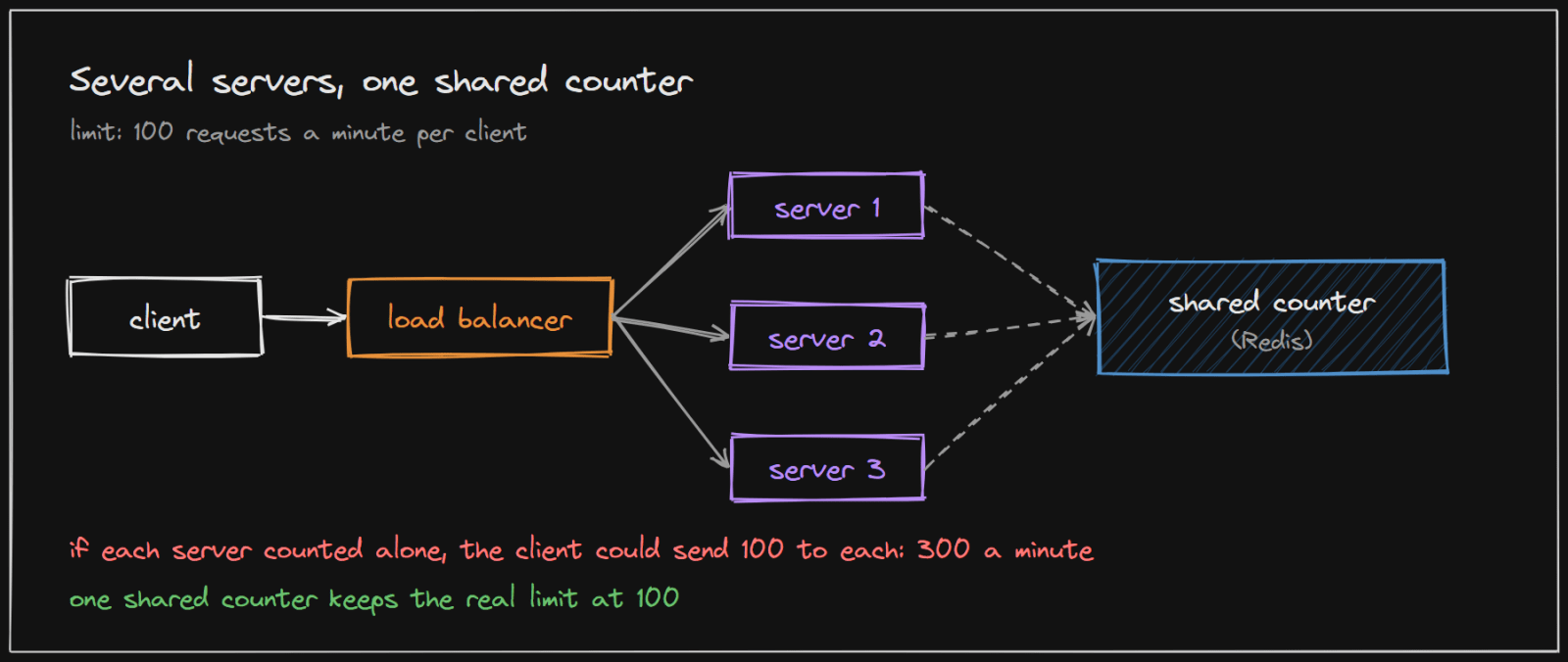
With one server, the counter can live in memory. With several servers behind a load balancer, each would only see part of a client's traffic. If each counted alone, a client limited to 100 requests a minute could send 100 to each of three servers and get 300 through.
The usual fix is a shared counter, typically in an in-memory store such as Redis, that every server updates. This brings its own trade-offs:
- Speed. Every request now makes a quick network call to the counter store, so it must be fast and close by.
- Accuracy. Two servers reading and updating the same counter at the same moment can both let a request through. Atomic operations in the store prevent this.
- Availability. If the counter store is down, the system must decide whether to let all requests through or reject them. Most choose to let them through rather than block every user.
A real system: GitHub's API
GitHub's public REST API documents its limits clearly:
- Unauthenticated requests are limited to 60 requests per hour.
- Requests made with a personal access token get 5,000 requests per hour.
- Every response carries headers that tell the client where it stands:
x-ratelimit-limit,x-ratelimit-remaining,x-ratelimit-usedandx-ratelimit-reset(when the window resets). - Over the limit, the API returns 403 or 429, with
x-ratelimit-remainingat 0, and asks clients not to retry until the reset time.
GitHub's documentation also notes that x-ratelimit-remaining "may be higher on a later response than on an earlier one within the same rate limit window", because the count depends on which location handles the request. That is the shared-counter problem above, visible in a real system: perfectly exact counting across many machines is hard, so large systems accept a little inaccuracy.
Design choices to make
When designing a rate limiter, decide explicitly:
- Who is limited: a user, an API key, an IP address, or a combination.
- What the limit is: requests per second, minute or hour, and whether bursts are allowed (which points to a token bucket).
- Where it runs: a gateway in front of everything, or inside each service.
- What the client sees: a 429 with
Retry-Afterand remaining-count headers, so well-behaved clients can slow down by themselves. - What happens on failure: whether to allow or reject requests when the counter store is unavailable.
Implementing it in your project
- Java: Bucket4j is a "Java rate-limiting library based on token-bucket algorithm". It works in memory for one server and with Redis or other stores for many servers.
- Spring Cloud Gateway includes a Redis-backed request rate limiter, so limits are applied at the gateway before requests reach any service.
- Nginx can limit requests per client IP with its
limit_reqmodule, which is a cheap first line of defence in front of any application. - Your own, with Redis: for a fixed window,
INCRa key such asrate:user42:<current minute>and set an expiry on first use; reject when the count passes the limit. For a sliding window or token bucket, run the logic in a small Lua script so the read and update happen atomically.
Return 429 with a Retry-After header, and limit by user or API key where possible, falling back to IP address.
Sources and credibility
Everything above is written from scratch; the only figures and quotes come from the sources below, attributed where used.
Primary (highest confidence)
- Rate limits for the REST API, GitHub Docs. Source of the 60 and 5,000 requests per hour limits, the
x-ratelimit-*headers, the 403 or 429 responses and the quote about the remaining count. - RFC 6585: Additional HTTP Status Codes, section 4. Defines status code 429 and the optional
Retry-Afterheader.
Method
- The rate limiter design follows the rate limiter chapter of Alex Xu's System Design Interview, Vol. 1. Each algorithm's visualization page lists its own sources.
On copyright: the diagrams on this page were drawn for this article, and the explanations are original. Quoted phrases are short and attributed.