One Server To Many
One Server To Many
Every big system you have heard of started as something small, often a single machine. It did not become big by being designed big on day one. It grew one step at a time, and each step fixed the one bottleneck the previous setup had run into. Learn that sequence and you can explain almost any architecture, and answer the most common system design interview question: "Here is one server. What breaks first as traffic grows, and what do you do about it?"
The starting point: everything on one server
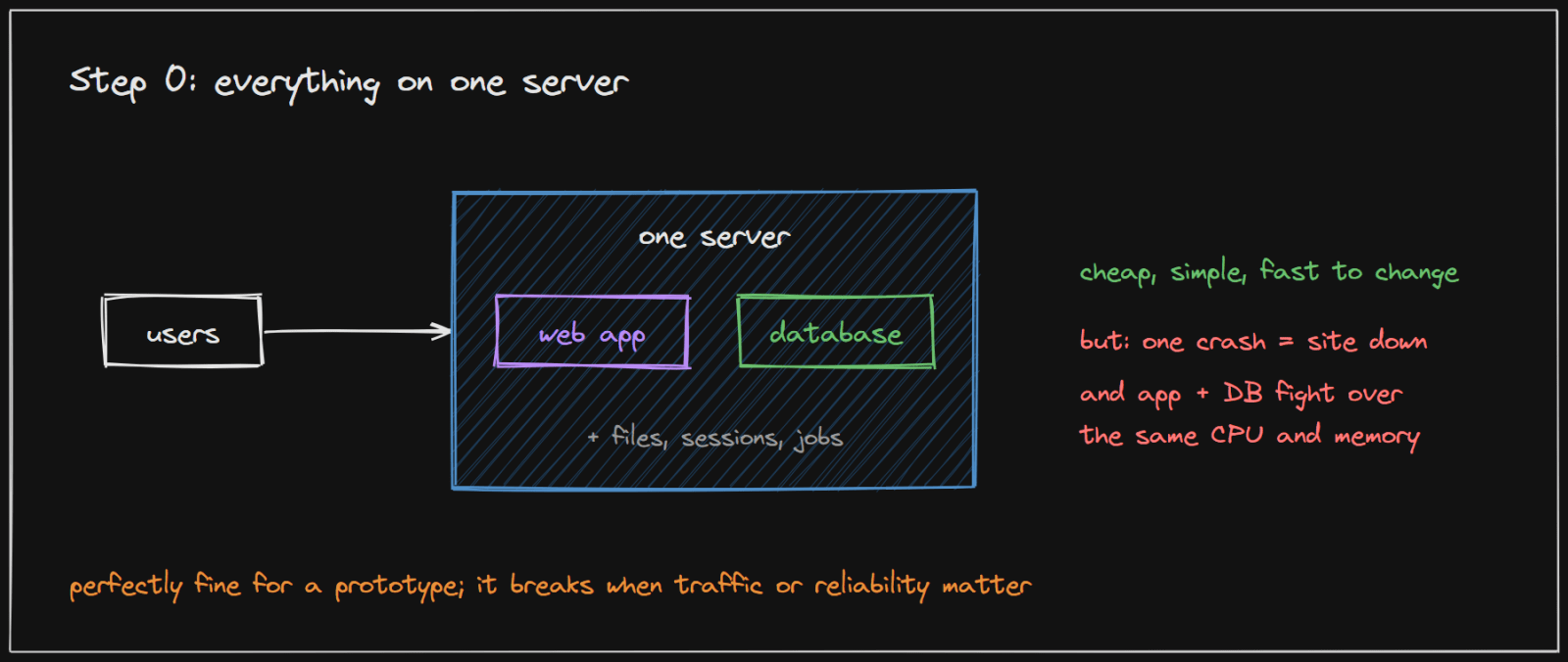
One machine runs everything: the web application, the database, uploaded files, background jobs. Users type your address, DNS points them at that machine, and it answers. For a prototype or a young product this is the right choice. It is cheap, there is only one thing to deploy, and you can change anything in minutes.
What breaks first
Two things, usually close together:
- They fight over the same machine. The web app and the database share one CPU and one pool of memory. A slow query makes every page slow, and a burst of traffic starves the database.
- One crash takes everything down. There is no spare. A full disk, a bad deploy or a hardware fault is a complete outage.
From here on, every step is a response to a problem like these. That is the whole method.
The journey, one bottleneck at a time
Step 1: move the database to its own machine
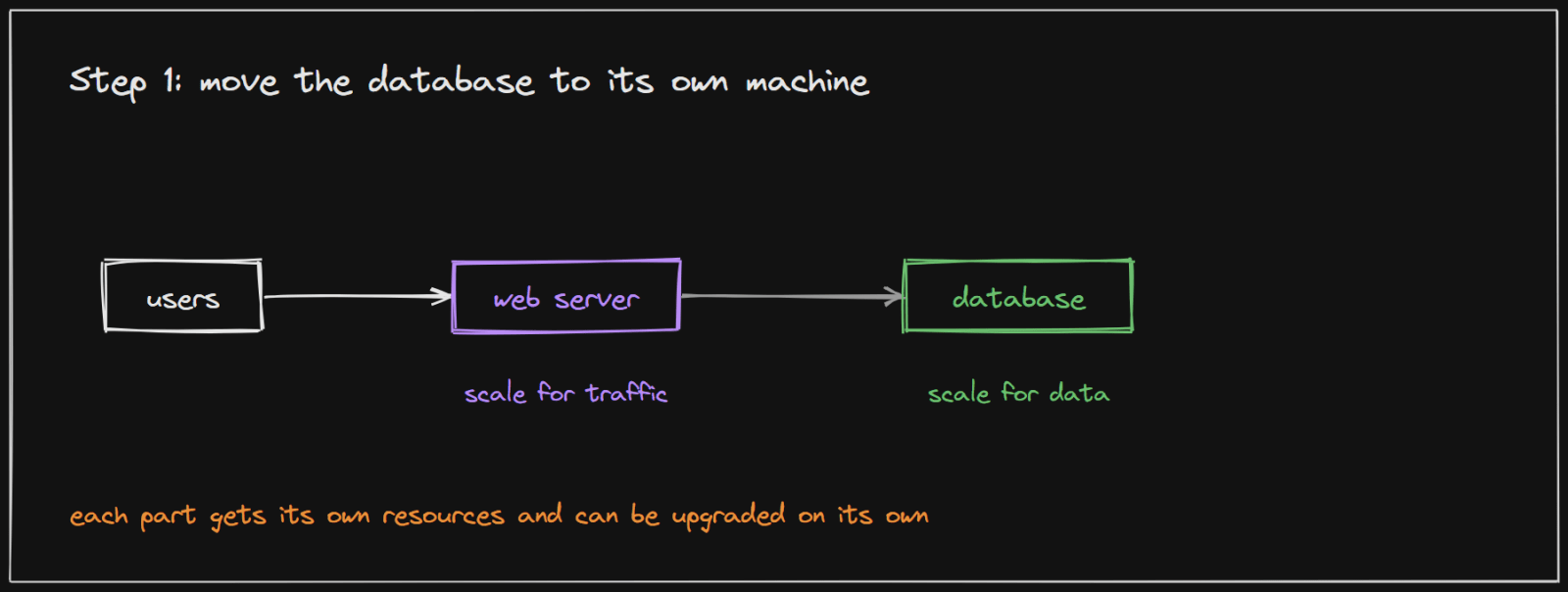
The first split is almost always the database. The web server needs CPU to handle requests; the database needs memory and fast disks to hold data. Apart, each gets resources suited to it, can be upgraded on its own, and a crashed web server no longer risks the data.
Step 2: a load balancer and several web servers
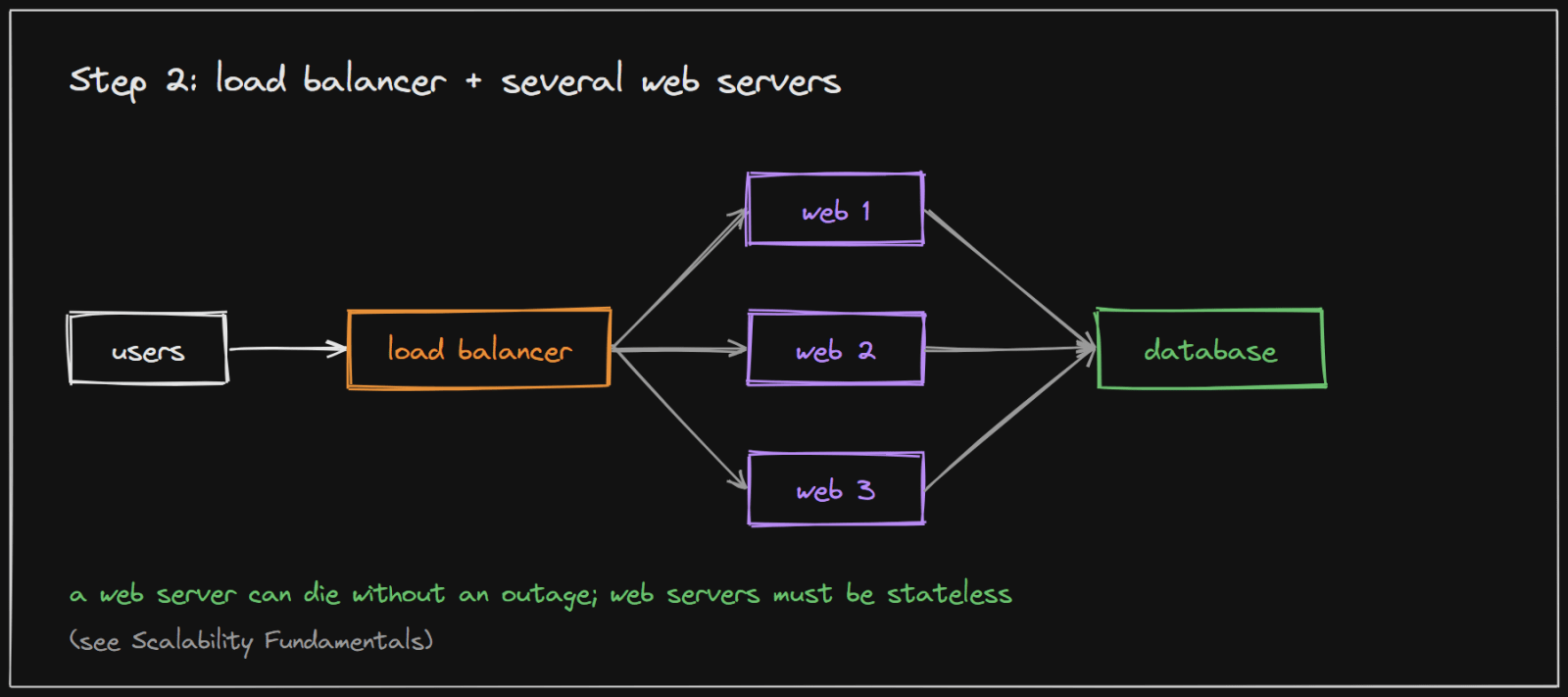
When one web server cannot keep up, run several identical ones and put a load balancer in front to share out the requests. This also fixes reliability: if one web server dies, the balancer stops sending it traffic and users never notice.
There is one condition. The web servers must be stateless, keeping nothing about a user in their own memory between requests, or a user bounced to a different server loses their session. The Scalability Fundamentals topic explains why, with pictures.
Step 3: copy the database for reads
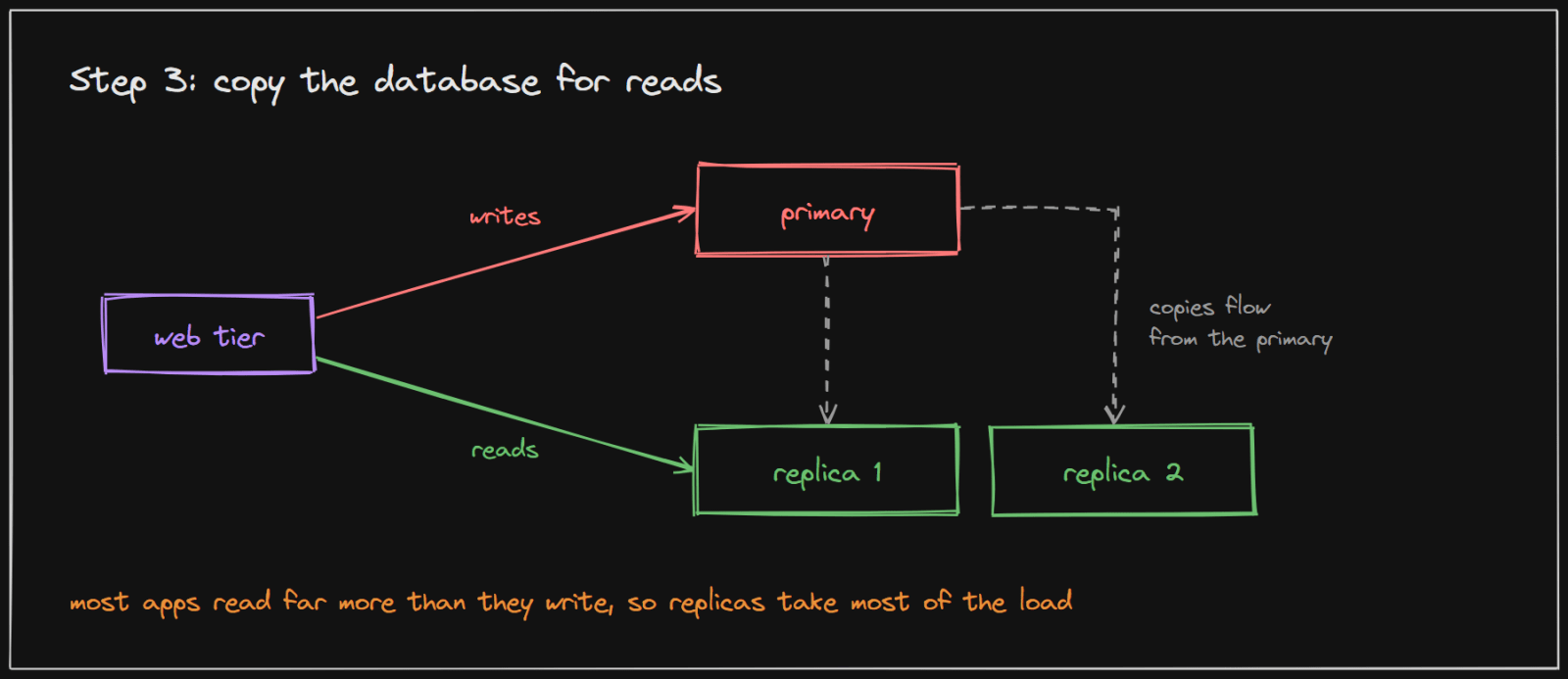
Now the single database is the busiest machine. Most apps read far more than they write (people view a post many more times than it is written), so the standard move is replication: one primary takes every write, and one or more replicas keep copies and answer reads. Reads spread out, and if the primary fails, a replica can be promoted to take its place.
The catch to remember: copies arrive a moment later, so a read from a replica can briefly show slightly old data. For a feed that is fine; for "did my payment go through?" read from the primary.
Steps 4 to 6: cache, CDN, queue and shards
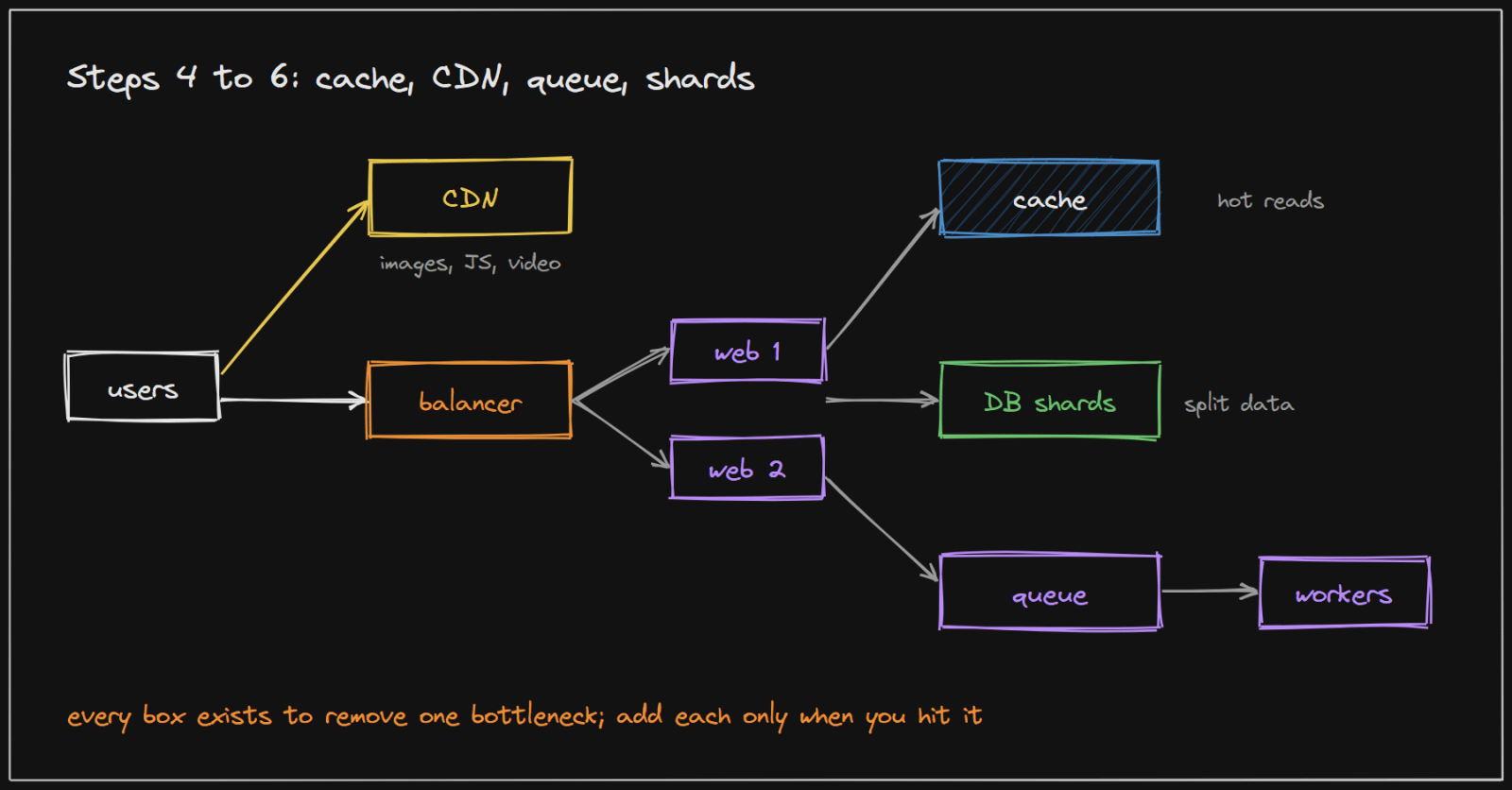
Each of these removes one more kind of load:
- Cache. Keep the most requested data in memory, in a store like Redis or Memcached, so most reads never touch the database at all. It is usually the biggest win for the least effort.
- CDN. Images, videos and scripts are the same for everyone, so copy them to servers spread around the world, close to the user. Your own servers stop sending heavy files.
- Queue and workers. Anything slow that the user does not need to wait for, such as resizing a photo or sending an email, goes into a queue. Background workers process it, and the request returns at once.
- Shards. When one primary can no longer take all the writes, or the data no longer fits, split the data across several databases. It is powerful and costly, so it comes last. The data partitioning visualizations show how records are assigned to shards.
A real system: Instagram
Instagram is a good example because, about a year after launch, its engineers wrote down exactly what was running. That early post on their engineering blog describes "a startup with a small engineering team" serving "14 million+ users in a little over a year", and almost every box above appears in it:
- Load balancing: Amazon's Elastic Load Balancer "with 3 NGINX instances behind it", taken out of rotation automatically if they fail a health check.
- Web servers: Django on Amazon machines, where "we've gone from just a few of these machines to over 25 of them".
- Database: user and photo data in PostgreSQL, sharded across instances, with replicas.
- Cache: 6 Memcached instances, plus Redis for the main feed, the activity feed and sessions (shared state, so the web servers can stay stateless).
- CDN and files: photos stored in Amazon S3 and served through the CloudFront CDN.
- Queue: slow work such as sharing a photo to Twitter or Facebook goes into a task queue (Gearman), so "media uploads can finish quickly".
Their stated principles are the best summary of this whole topic: "Keep it very simple", "Don't re-invent the wheel", and use proven technologies where possible.
How to use this in an interview
- Start small on purpose. Draw one server first, then say what breaks first at the traffic in the question.
- Name the bottleneck before the fix. "The database is now the busiest machine, so..." shows you know why each box exists.
- Add one step at a time, cheapest fix first: split the database, add web servers, replicas, cache and CDN, a queue, and shards last.
- Size it. A little arithmetic tells you which step you actually need: see Back-of-the-Envelope Estimation.
Implementing it in your project
A practical path for a real project, taking each step only when the previous one is not enough:
- One server: the application and database together, for example with Docker Compose. Fine for launch.
- Separate the database: a managed database (or a second machine) so the data is backed up and independent of app deploys.
- Two app instances behind a reverse proxy such as Nginx or Caddy, once uptime matters. Make the app stateless first.
- A cache (Redis) for the hottest reads, with a TTL on every key.
- A queue for slow work such as emails and image processing: a Redis-backed job queue, RabbitMQ or Kafka, with separate worker processes.
- Read replicas, then partitioning, only when measurements show the database is the limit.
Add monitoring of latency, errors and database load from step 1, so each next step is chosen by data rather than guesswork.
Sources and credibility
Everything above is written from scratch; the only figures and quotes come from the source below, attributed where used.
Primary (the organisation's own material, highest confidence)
- What Powers Instagram: Hundreds of Instances, Dozens of Technologies, Instagram Engineering blog, written a little over a year after launch. Read through the Internet Archive's copy of the original post, because the current blog address did not respond. Source of the user count, the load balancer and server counts, the database, cache, CDN and queue choices, and the stated principles.
This describes Instagram at that early stage, not how it runs today.
On copyright: the diagrams on this page were drawn for this article, and the explanations are original. Quoted phrases are short and attributed.