Making Applications Faster
Making Applications Faster
A slow application loses users, and usually the cause is not one big problem but several ordinary ones: a missing index, a query repeated in a loop, a page that loads a thousand rows to show twenty, a file sent again that the browser already had. This topic is a practical tour of the techniques that fix them, in the order you should reach for them, from the database out to the browser.
The first rule: measure before you change anything
The common mistake is optimising whatever looks slow in the code. Most of the time is usually spent somewhere else entirely. So:
- Measure the slow end, not the average. Track the 95th and 99th percentile response times (p95, p99): the experience of your unluckiest users.
- Find where the time goes. For one slow request, break it into its parts: time in the database, in calls to other services, in your own code, in the network, in the browser. Tracing tools and request logs do this.
- Fix the biggest part first, measure again, and stop when it is fast enough. A 10x improvement to something that takes 2% of the time saves almost nothing.
In most web applications, the biggest part is the database. That is where to look first.
The database
Add the right indexes
Without an index, a query that filters rows has to read the whole table (a sequential scan). With one, it jumps straight to the matching rows. On a table of a million rows, that is the difference between seconds and milliseconds.
- Index the columns you filter, join and sort on, including every foreign key (PostgreSQL does not index them automatically).
- Check a slow query's plan with
EXPLAIN ANALYZE; a "Seq Scan" on a large table usually means a missing index. - Do not index everything: every index slows down writes and takes space. See Unique IDs and B-Tree Indexes for how indexes work.
Fix N+1 queries
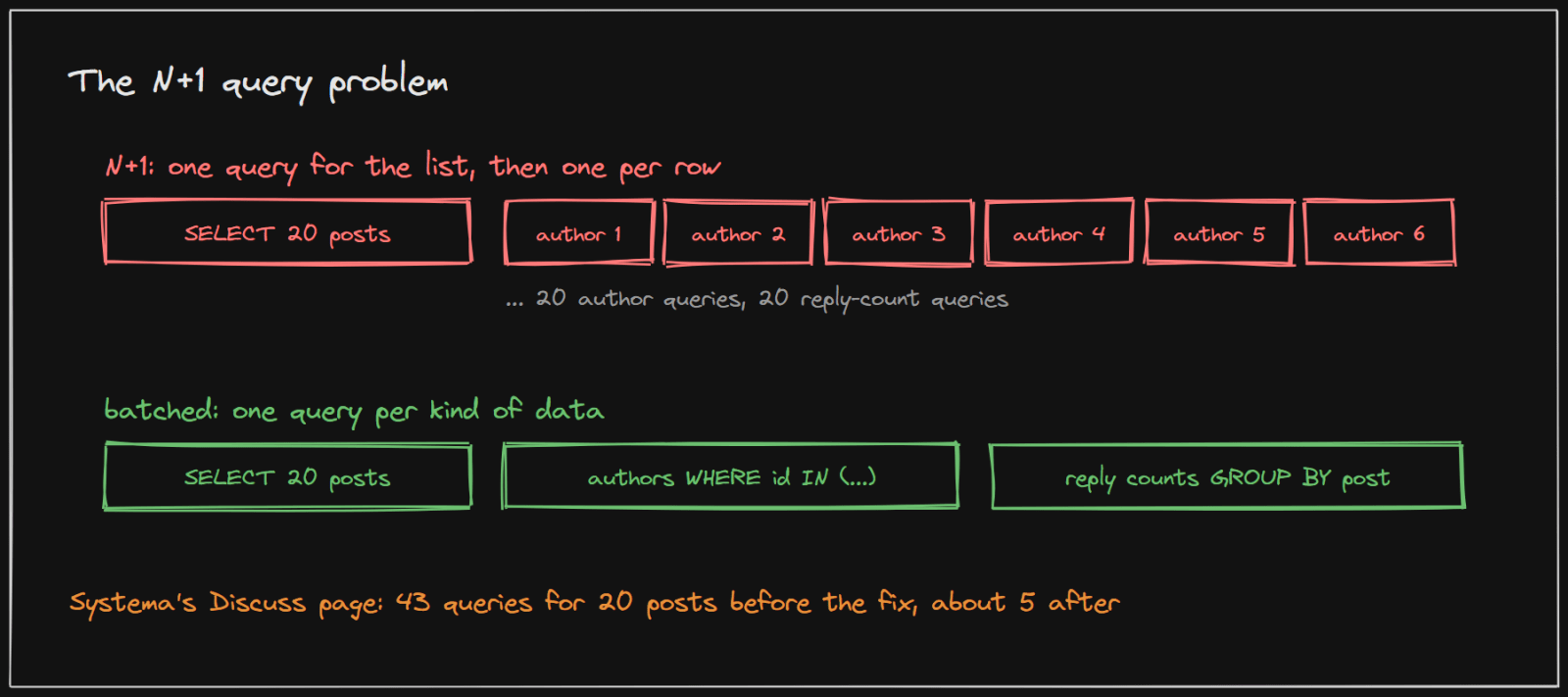
The N+1 problem is the most common performance bug in applications that use an ORM. The code loads a list (1 query), then, for each item, loads something related (N more queries). Each query is fast, so it never looks slow in testing, but a page of 20 items quietly makes 21 or 41 trips to the database.
The fix is to load related data in batches: one query for all the authors (WHERE id IN (...)), one grouped query for all the counts (GROUP BY), or a join. Your ORM has tools for this (for example JOIN FETCH, entity graphs or batch fetching in Hibernate, select_related and prefetch_related in Django, include in Prisma).
Only fetch what you need
- Select only the columns you use.
SELECT *on a table with large text columns moves data the page never shows. - Never load a whole table to show part of it. Filter and limit in the database, not in application code.
Paginate properly
Lists must be split into pages. There are two ways, and the difference grows with the data.
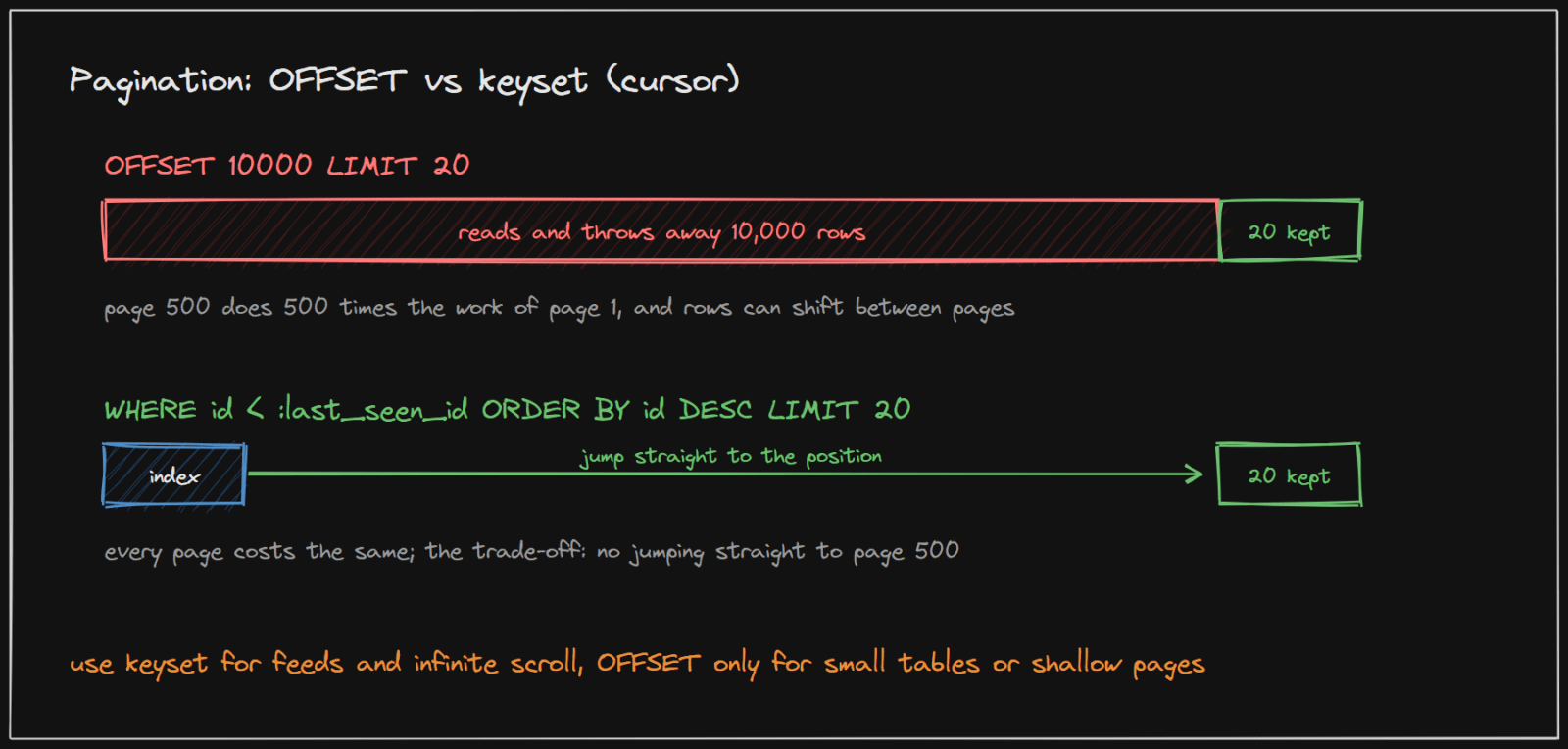
- OFFSET pagination (
LIMIT 20 OFFSET 10000) is simple and lets users jump to any page. But as Markus Winand explains on Use The Index, Luke, the database "must still fetch these rows from the disk and bring them in order before it can send the following ones": page 500 does about 500 times the work of page 1. Rows inserted between requests can also shift pages, so users see duplicates. - Keyset (cursor) pagination remembers the last row seen and asks for the next ones:
WHERE id < :last_seen_id ORDER BY id DESC LIMIT 20. With an index, every page costs the same. In Winand's words: "just use a where clause that selects only data you haven't seen yet." The trade-off: "you cannot directly navigate to arbitrary pages."
Rule of thumb: keyset pagination for feeds, timelines, infinite scroll and APIs that clients page through; OFFSET only for small tables or when users rarely go past the first few pages. In an API, return an opaque cursor (for example the last ID, encoded) rather than a page number.
Reuse connections
Opening a database connection per request is slow, and too many connections make the database itself slower. A small connection pool fixes both; see Connection Pooling.
Batch writes
Inserting 1,000 rows one at a time is 1,000 round trips; one multi-row insert or a batch is one or a few. The same applies to updates: do them in a single statement where possible.
Caching
Caching is usually the largest single gain once the database is in order. See Caching for the patterns and for keeping caches correct. Three layers matter for speed:
- In the application or a shared cache (Redis): results of expensive queries and computations.
- In the browser, with HTTP caching headers: so the browser does not download what it already has.
- On a CDN: images, scripts and other files served from a server near the user.
HTTP caching: let the browser skip the work
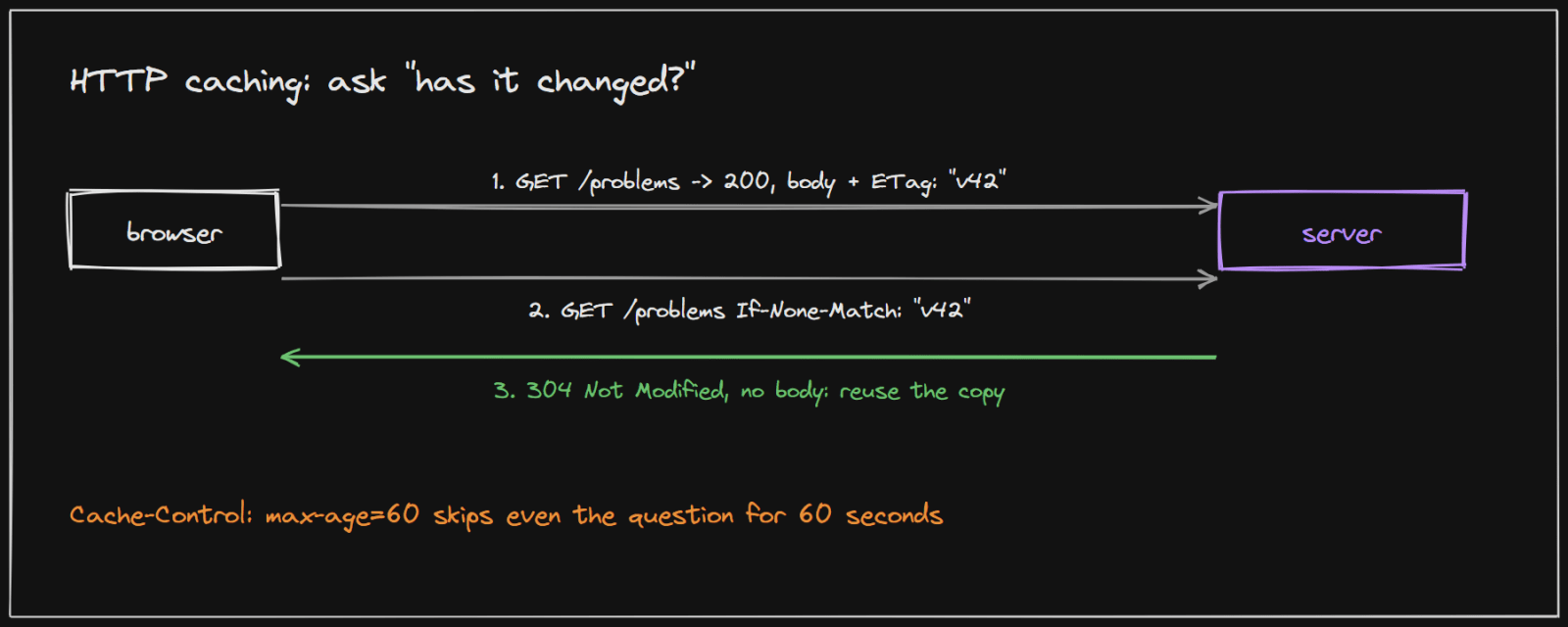
Cache-Control: max-age=60tells the browser the response "remains fresh until N seconds after the response is generated" (MDN), so it is reused without asking at all.- An
ETagis "an identifier for a specific version of a resource". The browser sends it back inIf-None-Match, and if nothing changed the server replies304 Not Modifiedwithout a body, so "a web server does not need to resend a full response if the content has not changed". - For files whose names include a content hash (most build tools produce these), use a very long
max-age: a changed file gets a new name.
Do less work during the request
- Move slow work to a queue. Sending emails, resizing images, generating reports and calling slow third-party APIs can happen after the response. The request returns at once; workers do the rest. See One Server To Many.
- Precompute what is read often. Store a post's like count on the post instead of counting likes on every page view, or use a materialized view for an expensive report, refreshed on a schedule.
- Do independent things in parallel. If a page needs data from three services, request them at the same time, not one after another.
- Set timeouts from measurement. Every call to another service needs a timeout, chosen from that service's real response times, so one slow dependency cannot hold every request hostage.
The network
- Compress responses with gzip or Brotli. Text such as JSON, HTML and JavaScript typically shrinks several times over. Most web servers and CDNs do this with one setting.
- Send less data. Return only the fields the client uses; avoid huge nested responses.
- Avoid chatty APIs. A screen that needs ten small API calls in sequence pays ten round trips. Offer an endpoint that returns what the screen needs, or batch the calls.
- Keep connections open (HTTP keep-alive, HTTP/2) so each request does not set up a new connection.
The frontend
- Load less at the start. Split JavaScript so each page loads only its own code, and load below-the-fold images lazily.
- Size images correctly and use modern formats; a phone does not need a 4,000-pixel photo.
- Prefetch with care. Frameworks can fetch linked pages in advance so clicks feel instant, but fetching everything visible can flood the network and slow the page you are actually on.
- Measure in the browser: the Network tab of the developer tools and Lighthouse show what loads, how big it is and how long it takes.
A real system: Systema's own performance work
Two changes in this project's history show the method in practice, both found by measuring rather than guessing.
N+1 queries in Discuss and News. The listings batched vote counts correctly but still looked up each post's author, and on Discuss its reply count, one query per row: 43 queries for a 20-post Discuss page instead of about 5. The fix batched authors with one findAllById and reply counts with one grouped count query. The same change added a missing index on submissions.problem_id, which the problem list queried on every load and was reading by sequential scan.
A performance pass across the stack.
- An audit against the real database found 13 foreign-key columns with no index; every one got an index.
- The Problems list's cards used the framework's default link prefetching, which fetched every visible card's page as soon as it scrolled into view. Network capture showed a burst of prefetch requests and a real load time of 4.4 seconds, against under 1 second for other pages. Turning prefetch off for those cards fixed it; a click still navigates normally.
- A health check with a 3-second timeout sat in the middle of the service's real response range (0.2 to 7.6 seconds), so it reported failures that were not real. The timeout was set from the measured range instead.
None of these needed new infrastructure. Each was a measurement, a specific fix and a re-measurement.
Implementing it in your project
- Turn on query logging in development and count queries per request; a number that grows with the page size is an N+1. In Spring and Hibernate, log SQL and statistics; in Django, use the debug toolbar.
- Use
EXPLAIN ANALYZEon any query slower than a few milliseconds, and thepg_stat_statementsextension in PostgreSQL to find the queries that take the most total time. - Load-test before launch with a tool such as k6 or JMeter against a staging copy, and watch p95 and p99, not the average.
- Add caching headers and compression at the web server or CDN; they are usually a few lines of configuration.
- Profile the browser with the developer tools' Network and Performance tabs and Lighthouse.
How to use this in an interview
When asked how to make a system faster, start with measurement (which percentile, which part of the request), then go through the layers: indexes and query shape, caching, moving work off the request path, then network and frontend. Name a concrete technique at each layer and its cost: an index slows writes, a cache can be stale, a queue makes results arrive later.
Sources and credibility
Everything above is written from scratch; the quotes come from the sources below, attributed where used.
Primary (highest confidence)
- We need tool support for keyset pagination, Markus Winand, Use The Index, Luke. Source of the OFFSET and keyset quotes.
- Cache-Control and ETag, MDN Web Docs. Source of the HTTP caching quotes.
- Systema's own git history (the commits "Fix N+1 queries in Discuss/News post listing, index submissions.problem_id" and "Performance pass: index every FK, fix false Judge0 health-check timeouts, stop over-prefetching problem cards"). Source of the real-system figures.
Method
- The other techniques are standard practice; the descriptions and ordering are our own.
On copyright: the diagrams on this page were drawn for this article, and the explanations are original. Quoted phrases are short and attributed.